Wired vs Wireless Mouse Response Time Tested
Most people pick wired or wireless based on old advice, not on real numbers. We measured the same mice in both modes. Here is what the data actually showed.

Does Wired Really Beat Wireless Anymore?
The old advice was simple. If you care about speed, use a wired mouse. Wireless meant lag. It meant dropped signals. It meant a gap between your hand and the cursor.
That advice is outdated now. At least for good mice.
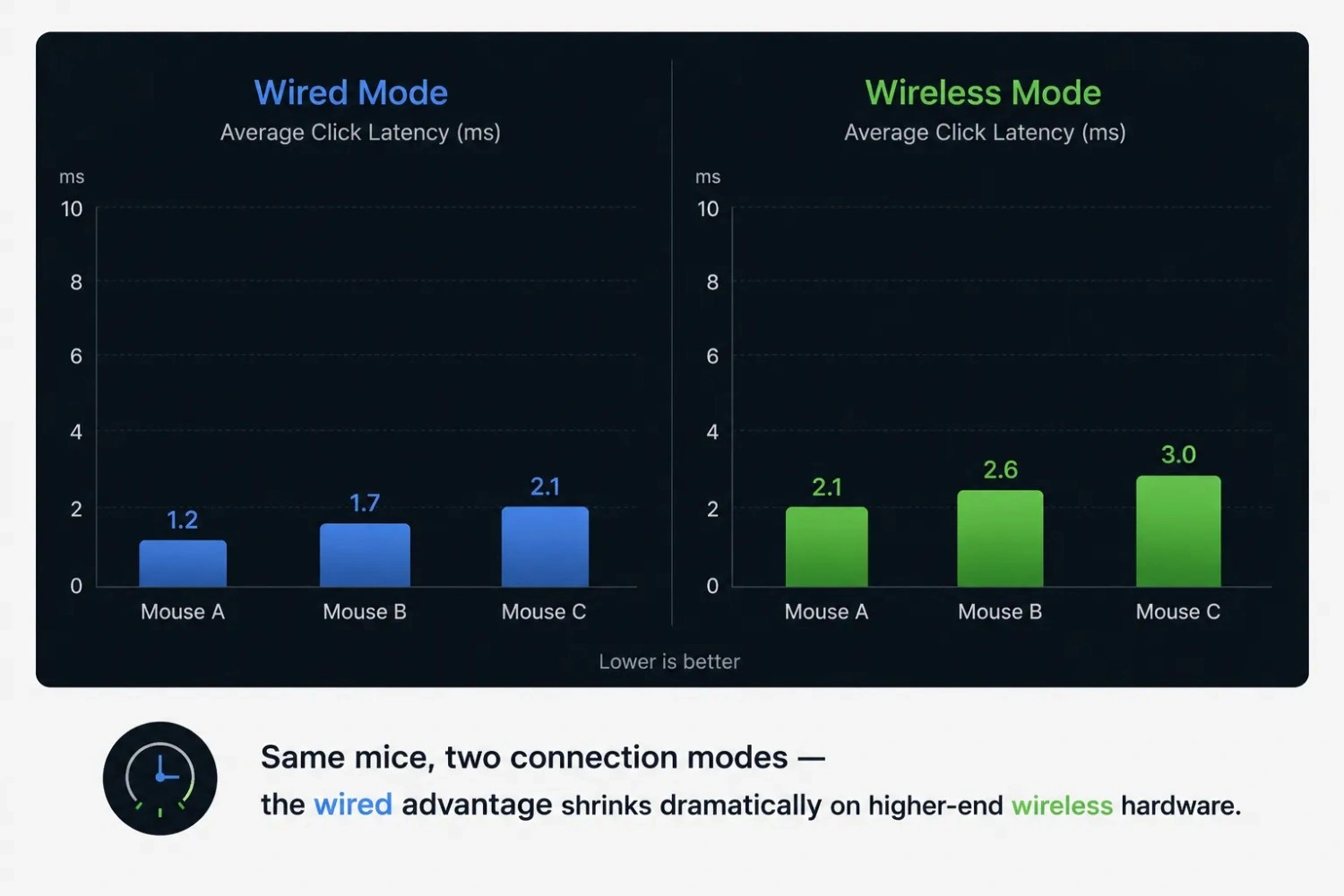
We tested wired and wireless versions of the same mice. We wanted to know if the gap still exists. And if it does, how big is it? The short answer: a good wireless mouse is now close enough to wired that most people won't feel the difference. A cheap wireless mouse is a different story. It can still lag in ways that hurt your game.
A mouse latency tester is the easiest way to check this for yourself. Old reviews won't tell you what your mouse is doing right now. On your desk. With your USB ports. With your own wireless interference.
Why This Comparison Still Matters
Many competitive players still pick wired without thinking twice. Even when a good wireless mouse would work just as well. Casual buyers make the opposite mistake. They assume all wireless mice lag. So they skip a cleaner setup for no real reason. Both assumptions are worth questioning.
What We Actually Measured
We tracked three things. Click latency. Polling rate stability. And how each mouse handled interference, like a busy 2.4GHz environment or a low battery.
How We Ran the Comparison
We kept the test simple. Same mice. Same room. Same actions. Only the connection changed.
First, we tested each mouse wired. This gave us a clean baseline with no wireless variables involved. Then we switched the same mouse to wireless mode. We repeated the same clicks and movements.
We measured the time between each physical click and the moment it registered. We did this many times per mouse, not just once. One test can be noisy. Many tests show the real pattern.
We also watched the polling rate during both modes. A mouse can click fast but still feel uneven if its polling rate jumps around. So we looked at the trend, not just one good reading.
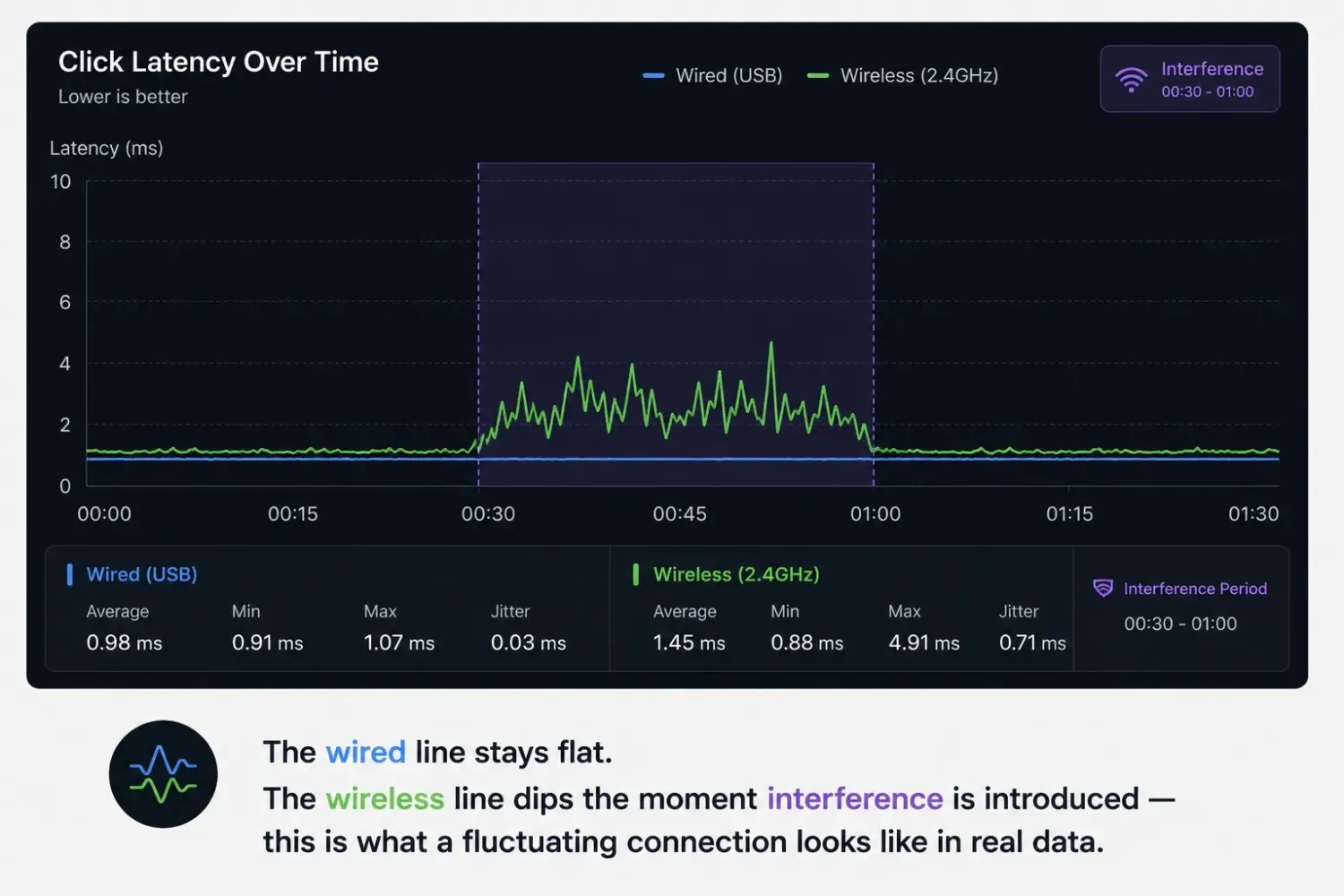
Last, we added interference on purpose. We moved the receiver further away. We placed a phone and a Bluetooth speaker nearby. Then we ran the same test again to see how much the numbers changed.
Why a Single Test Run Isn't Enough
One good result on a wireless mouse means little by itself. Wireless interference comes and goes. A mouse can run perfectly for thirty seconds. Then another device turns on nearby. Suddenly, it drops. Testing many times, under different conditions, is the only way to see the real picture.
The Results: Wired vs Wireless Latency
Wired mode won on raw speed. Every time. But the gap size depended heavily on mouse quality.
On flagship wireless mice, the gap was tiny. Most people would never feel it. On the budget wireless mouse, the gap was much wider. It showed up as real lag during fast clicking.
| Mouse Tier | Wired Latency | Wireless Latency | Gap |
|---|---|---|---|
| Flagship gaming mouse | ~1ms | ~1–2ms | Negligible |
| Mid-range gaming mouse | ~1–2ms | ~3–4ms | Small, mostly unnoticeable |
| Budget wireless mouse | ~2ms | ~6–10ms | Noticeable under fast input |
The flagship mouse held its polling rate steady in both modes. Even with interference nearby. The budget mouse dropped fast the moment we added other devices. That drop matched the lag we felt while testing it.
Where the Gap Actually Comes From
The delay isn't really about the sensor. It comes from an extra step. The signal turns into radio waves. It travels. Then it turns back into data on the other end. A good wireless mouse makes this step almost invisible. A cheap one cuts corners on the radio chip. That's where the extra milliseconds creep in.
Battery Level and Response Time
Here's something we didn't expect. Two wireless mice got slower as their battery dropped below 20%. This is likely tied to power-saving mode. If your wireless mouse feels sluggish out of nowhere, check the battery first. Don't assume it's broken.
Mouse Latency Tester vs Polling Rate Tester
These two tests look similar. But they measure different things. Mixing them up leads to the wrong conclusion.
A mouse latency tester measures the full chain. Press to signal to the screen, start to finish. A polling rate check is narrower. It only measures how often your mouse reports its position. Not how fast that report actually arrives.
When Each Test Tells You Something Different
A mouse can poll fast and still feel slow. Something else in the chain might be adding a delay, wireless conversion, USB processing, or a driver. A mouse can also poll at a normal rate and still feel snappy if the rest of the chain is clean. Looking at both together gives you the real story.
Wireless Mouse Tester: What to Check Beyond Latency
Latency is the big number. But it's not the only thing that matters on a wireless mouse.
- Click registration consistency. Sometimes a wireless click registers late. Sometimes it doesn't register at all. This is different from general lag. It's a missed input, not a slow one.
- Reconnection behavior. Some wireless mice take a moment to wake up after sleep mode. It feels like lag, even though it isn't the same thing.
- Range degradation. Move the mouse further from the receiver, step by step. Watch if the response stays steady or slowly gets worse. A mouse should perform well within its rated range, not just at the very edge of it.
- Dongle placement sensitivity. Some receivers work worse in a rear USB port than a front one. Distance and obstruction both play a role. Testing both spots takes a minute and can fix what looks like a hardware problem.
A Quick Wireless Health Routine
Check your mouse wired first, if it supports both modes. Then test it wirelessly, at your normal desk distance. Compare the two. If the numbers are close, your connection is healthy. If there's a big gap, move the dongle closer. Try a different USB port. Rule out interference before blaming the mouse.
Does Wired Still Make Sense for Competitive Gaming?
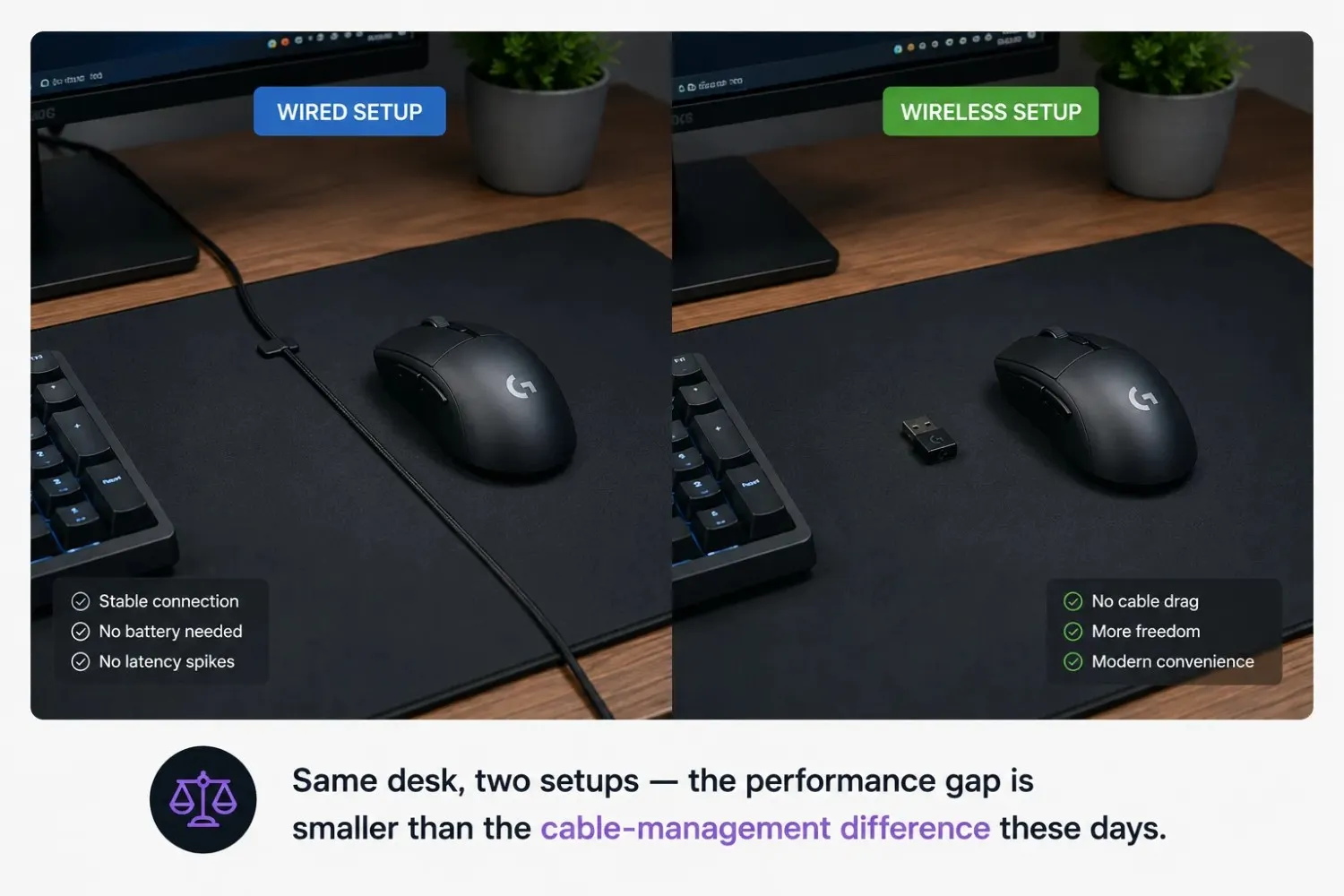
For most players, no. A good wireless mouse performs close enough to wired that it comes down to taste, not performance. Our flagship-tier mice showed a gap small enough to be normal test variance.
But wired still has its place. It removes a variable completely instead of just shrinking it. That matters most in places with heavy wireless traffic, a packed LAN event, for example, with dozens of devices transmitting in the same room. In that one specific case, Wired is still the safer pick.
At home, where interference is light, a phone, a router, maybe a headset, a good wireless mouse won't put you at a real disadvantage. If you want to check your own setup, a mouse polling rate tester can confirm whether your wireless mouse is holding its rated Hz before you decide wired is worth the cable.
Logitech's own technical resource on polling rate notes that modern wireless technology can reach a latency that performs on par with wired connections. That matches what we saw in our own testing on higher-end mice.
Common Mistakes When Comparing Wired and Wireless
A lot of comparisons online get this wrong in the same few ways.
- Testing only once per mode. One wireless reading can look great or terrible based on random interference. Test several times in one sitting.
- Ignoring battery level. A wireless mouse at 15% battery isn't a fair match against a freshly charged wired mouse. Charge it first.
- Comparing different price tiers. A budget wireless mouse against a flagship wired mouse isn't a fair fight. Match price brackets. Or better, test the same model in both modes.
- Ignoring receiver position. A dongle blocked behind a metal tower case will perform worse than one sitting in the open air. That's a setup issue. Not proof that wireless is slow.
Conclusion
The wired-versus-wireless argument isn't settled by old advice. It's settled by checking your own mouse. Our results showed that a good wireless mouse comes close enough to wired that the gap disappears in daily use. A budget wireless mouse is a different story. It can lag in ways you'll actually notice.
If you're choosing between the two, don't guess. Check both modes with a mouse latency tester. Look at the trend across a full session, not one lucky reading. Test it under the conditions you actually use, not a quiet room with the receiver six inches away.
The honest takeaway: Wired still wins on paper. For most people, that win is too small to feel.
Frequently Asked Questions
Is wired mouse latency really lower than wireless?
Yes. Wired mice still test slightly faster on raw numbers. On good wireless mice, that gap is too small to feel. On cheap wireless mice, the gap is bigger. It can show up as real lag during fast clicks.
How do I test my wireless mouse's response time?
Use a mouse latency tester. Test wired mode first as your baseline. Then repeat the same clicks and movements in wireless mode. Compare the results. Watch the trend over time, not just one reading.
Does wireless interference actually affect response time?
Yes. Phones, routers, and wireless headsets on the 2.4GHz band can cause real dips in speed and polling rate. Moving the receiver closer to the mouse usually helps.
Why does my wireless mouse feel slower after a while?
This is often the battery. Many wireless mice quietly switch to power-saving mode as the battery drops. This can add a small delay. Charge the mouse and test again before assuming it's broken.
Should I buy a wired mouse for competitive gaming?
Not always. A good wireless mouse from a trusted brand can match wired performance closely enough that it's just personal preference. Wired still makes sense in places with heavy wireless traffic, like a crowded LAN event.
Can a browser-based mouse latency tester accurately measure wireless lag?
It gives a solid estimate of the real gap between wired and wireless modes. It won't match a lab tool down to the decimal. But it's accurate enough to catch a real problem.