How to Use the Mouse Double-Click Tester
The tool on this page runs in your browser. No download, no install, no account. Click inside the test zone, and it starts logging every event with a timestamp.
Step 1: Click once, normally, inside the test zone.
Do not try to click fast or slow on purpose. Just press the button the way you normally would.
Step 2: Check the counter.
If it reads 1, that click was clean. If it reads 2 from a single press, you have already reproduced a double-click fault.
Step 3: Repeat 20 to 30 times at a normal pace.
A single clean result does not rule out an intermittent fault. Switch bounce often shows up only some of the time, so repetition is what catches it.
Step 4: Read the millisecond gap, not just the count.
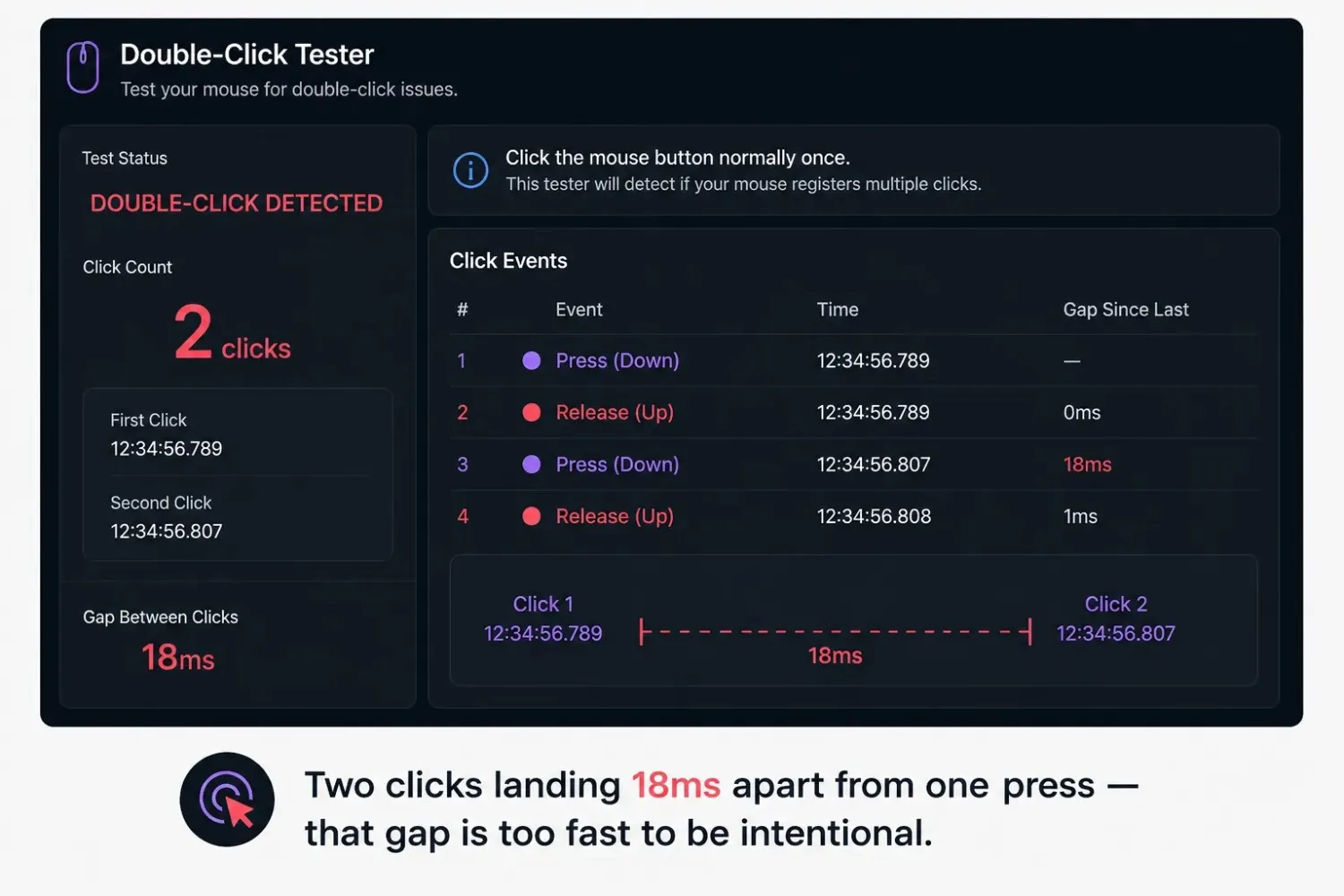
When two events fire from one press, the tool shows the time between them. A gap under roughly 50ms is faster than a human finger can deliberately repeat, the strongest sign that the switch, not your finger, produced the second click.
Step 5: Adjust the detection threshold if your tool allows it.
Some testers, including this one, let you change the window used to decide what counts as a double-click. Lowering the threshold makes the test stricter; raising it makes it more forgiving. Useful if you're trying to reproduce a fault that only shows up under fast clicking.
Reading Your Results
A healthy result looks boring: every click registers exactly once, no matter how many times you repeat it. A faulty result is the opposite; some clicks register cleanly, others register as a pair, and you cannot fix the pattern just by clicking more carefully. If the fault disappears when you click more slowly, that points to the threshold setting rather than the switch itself.
What Is a Mouse Double-Click Tester?
A mouse double-click tester does one job: it tells you whether a single press of your mouse button is firing once or twice. You click, it timestamps the event, and if a second click lands inside a tiny window of time, it flags the pair as a double-click fault instead of two deliberate presses.
This is different from a general mouse tester, which checks every button, the scroll wheel, and side inputs at once. A double-click mouse tester narrows in on one failure pattern, a single physical press producing two registered clicks, because that pattern causes some of the most frustrating accidents a mouse can produce. A file opens when you meant to select it. A weapon fires twice in a game when you tap once. A drag-and-drop drops early because the second click landed mid-motion.
The good news is that this fault is easy to catch. It usually takes under a minute to know whether your mouse is genuinely double-clicking on a single press, or whether something else, a Windows setting, a worn mousepad, or an over-eager finger, is creating the same symptom.
Why This Fault Needs a Dedicated Test
A general button test confirms a click registered. This test confirms how many events fired from one press and how far apart they landed in milliseconds. That distinction matters because the fix is different depending on the cause; a hardware switch problem and a software threshold problem look identical to the user but require opposite solutions.
Who Actually Needs This Test
Gamers notice it first, since a double-fired shot or an accidental double-tap on an ability key has an immediate cost mid-match. Office workers notice it when files open instead of getting selected, or a single click in a spreadsheet selects and then immediately edits a cell. Anyone whose mouse is a few years old and has started misbehaving occasionally is the core audience here.
What Causes a Mouse to Double-Click on a Single Press
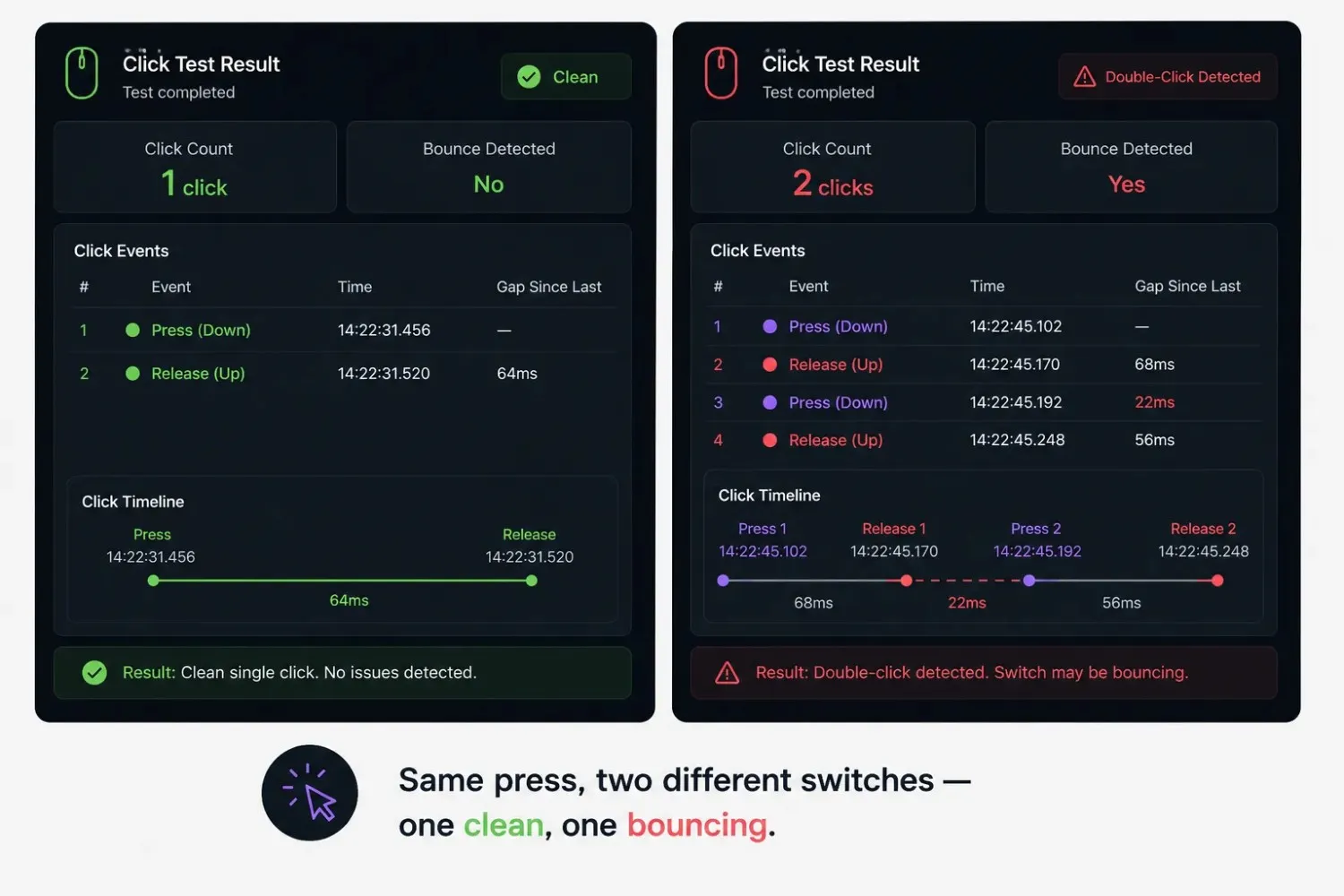
Underneath the shell, most mouse buttons rely on a mechanical switch, two metal contacts that touch when you press down. A new switch closes that contact cleanly, once, instantly. An aging switch does not always manage that. The contact can bounce, touching, separating, and touching again within a few milliseconds, a behavior called contact bounce or switch chatter.
Firmware is supposed to filter that bounce out and report one clean click. As a switch wears, the bounce window stretches until it lasts longer than the firmware's filter can catch. At that point, your one physical press becomes two registered events, and there is nothing wrong with how you clicked; the fault sits inside the switch.
This is the same mechanism that causes keyboard keys to register letters twice, just on a different component. Left click wears first since it's the most-pressed button on any mouse. If you want the full breakdown of causes and fixes, the guide on mouse double clicking on its own walks through each one in detail, from switch bounce to driver issues to when it's actually time to replace the mouse.
It Is Not Always the Switch
A few other causes produce the same symptom with no hardware fault at all:
- A double-click speed setting that's too forgiving, a wide window can merge two slow, deliberate clicks into one double-click event.
- A worn or dirty mousepad surface causes micro-bounces as the mouse settles.
- Driver or software remapping, duplicating a click signal before it reaches the OS.
- A low battery on a wireless mouse, which causes erratic timing that clears up once charged.
Testing while plugged in via USB, with a fresh battery if wireless, rules out two of these in under a minute.
Mouse Double Click Tester vs Mouse Tester
A general mouse tester checks every input at once: left, right, middle, scroll wheel, and side buttons, to confirm each one registers correctly. A double-click tester narrows in on a single question: Is this one press firing as one event or two? If you already suspect double-clicking specifically, this tool gets you an answer faster. If you're not sure what's wrong yet, start with the full mouse tester and come back here once double-clicking shows up as the pattern.
When to Use Each One
Run the full mouse tester first if you haven't pinned down the problem; it covers button registration, scroll wheel, and side buttons in one pass. Come back to this test once you suspect one button specifically, since it gives you millisecond-level detail that the general test doesn't show.
Mouse Double Click Tester vs Polling Rate Tester
These two get confused because both involve timing, but they measure different layers of the same mouse. A double-click test checks whether a single press produces one clean signal or two. A polling rate test checks how often your mouse reports its cursor position, independent of clicking at all.
A mouse can have a perfectly stable polling rate and still double-click on every third press, because polling rate measures position updates, not button-press integrity. If clicking feels unreliable, specifically, the double-click test is the right place to start. For position-reporting consistency, the polling rate tester covers that separately.
Fixing a Mouse That Double-Clicks
Once the test confirms the fault is real and repeatable, the fix depends on the cause.
- Short, consistent gap (under roughly 30–50ms) regardless of how carefully you click points to switch bounce. Try compressed air under the button shell first. If that doesn't help, the switch has likely reached the end of its mechanical life.
- Fault only on slow, deliberate click points to your OS's double-click speed setting rather than hardware. On Windows, it's adjusted under Mouse Properties → Buttons, the same kind of timing window this tool measures, just applied system-wide.
- Fault only in wireless mode, charge the mouse or swap batteries, then retest. Power instability can mimic switch bounce closely enough to cause a misdiagnosis.
- Nothing fixes it, and the mouse has seen a couple of years of heavy use; the switch has likely worn past a software fix, and you're choosing between a repair and replacement.
What People Are Actually Asking About Double-Clicking
A lot of people in mouse troubleshooting forums think a double-click problem means the mouse is dying. That's often wrong. In many cases, it's just a setting. The advice that comes up again and again is simple: test it before you replace anything. A quick check shows you whether it's a contact bounce or just a threshold that needs adjusting.
There's another thing worth knowing. This fault can hide for weeks. You won't notice it until it causes real damage, like an accidental double-open or a doubled input in a game. A dead button is obvious right away. A bouncing switch is not. It might only show up once in a while. That's why clicking 20 to 30 times during the test matters more than clicking once.
If you want to see how Windows handles this setting, Microsoft explains it here. It shows exactly where the setting lives. That's useful if your result points to a threshold problem instead of a worn-out switch.
Conclusion
A mouse double-click tester answers a narrow question that saves real frustration: Is your mouse firing one clean signal per press, or two? The test takes under a minute, needs no installation, and gives you a millisecond-level answer instead of a guess.
If the fault is consistent and the gap between clicks is too short to be a deliberate double-tap, you're likely looking at a worn switch. If it only shows up occasionally or on slow clicks, check your double-click speed setting before reaching for a replacement. Testing first means fixing the actual problem instead of replacing a mouse that might have had nothing wrong with it.
Frequently Asked Questions
What is a mouse double-click tester?
A browser tool that checks whether a single physical press of your mouse button registers as one click or two. It times the gap between any duplicate events to help confirm whether the cause is a worn switch or a software setting.
How do I know if my mouse is double-clicking on a single press?
Click once, normally, inside a double-click testing tool, and check the counter. If it reads 2 from one press, repeat 20 to 30 times to see if the pattern holds. A short, repeatable gap under 50ms points to a hardware fault rather than an accidental fast click.
Is double-clicking always a hardware problem?
No. A double-click speed setting that's too forgiving can merge two slow, deliberate clicks into a single double-click event, which looks identical to a switch bounce. Check your OS's double-click speed setting before assuming the switch has failed.
Can a low battery cause double-clicking on a wireless mouse?
Yes. Low battery levels can cause erratic signal timing that closely resembles switch bounce. Charging the mouse fully or swapping batteries and retesting rules this out quickly.
What is switch bounce?
Switch bounce, also called contact bounce or chatter, happens when the metal contacts inside a mechanical mouse switch briefly separate and reconnect after being pressed, sending more than one signal for a single press. It's the most common cause of unintended double-clicking in heavily used mice.
Can I fix a double-clicking mouse myself?
Sometimes. Cleaning under the button shell with compressed air resolves cases caused by dust. If the switch itself has worn out, replacing it requires basic soldering skills. If neither is practical, replacing the mouse is the simpler option once you've confirmed the fault is genuinely hardware-related.
Is a double-click tester different from a regular click speed test?
Yes. A click speed test measures how many clicks you can produce per second and says nothing about whether each press registers cleanly. A double-click tester measures the integrity of a single press, a completely separate question from speed.